Understanding Kubernetes
Evolution of Deployment & Rise of Kubernetes

🧱 Traditional Approach
Earlier, companies owned physical servers to deploy their applications.
This meant handling everything – networking, OS, hardware failures, scaling – manually.
☁️ Cloud Revolution: Enter AWS
AWS (Amazon Web Services) introduced the concept of cloud computing.
Instead of owning servers, developers could rent virtual machines from AWS.
AWS managed hardware, and users only handled app logic.
🐞 Problem: "Works on My Machine"
Even with cloud VMs, deployment issues remained:
- App runs fine on dev machine but crashes on server.
Why? Missing dependencies, different OS versions, bad configs.
🧳 Solution 1: Virtual Machines (VMs)
VMs solve this by packaging:
- App + OS + libraries + config into an isolated environment.
But they’re heavy, slow to boot, and resource-hungry.
📦 Solution 2: Containers
Containers (like Docker) solved VM’s weight issue by:
Sharing the host’s OS kernel, avoiding full OS installation.
Packing only what's needed to run the app.
Lightweight, fast, and portable across systems.
But Who Manages 1000s of Containers?
Container explosion led to orchestration issues:
- How to deploy, scale, update, and restart containers across machines?
Google’s Solution → Borg
Internally, Google built Borg, a container orchestration system to manage all this.
But it was proprietary.
Enter Kubernetes (K8s)
Google open-sourced a refined version of Borg: Kubernetes.
It was donated to CNCF (Cloud Native Computing Foundation) to ensure it stays cloud-agnostic.
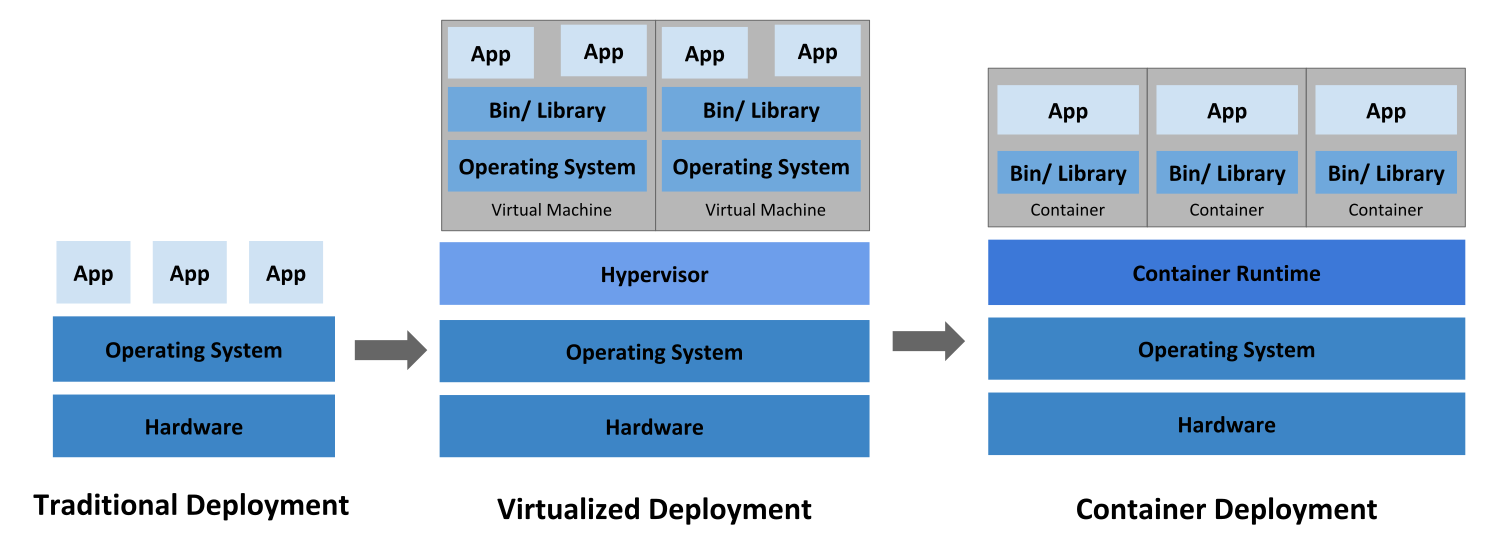
From left to right:
Physical Machine (manually managed)
Virtual Machine (heavy but isolated)
Container (light, portable)
Kubernetes (manages containers at scale)
☸️ What is Kubernetes?
A cloud-agnostic container orchestration system.
Handles:
Deployments
Scaling
Networking
Auto-healing
Load balancing
Avoids vendor lock-in — works on AWS, Azure, GCP, DigitalOcean, etc.
🧠 Kubernetes Architecture
🛡️ Control Plane – The Brain (Usually 1 machine)
Responsible for managing the entire Kubernetes cluster.
| Component | Role |
API Server | Entry point. Devs interact via kubectl or YAML configs. |
Scheduler | Decides which node runs what pod. |
Controller Manager | Ensures the current state = desired state (e.g., 3 pods running). |
etcd | Key-value store holding cluster state (e.g., which pods are alive). |
Think of it like a central command center with real-time cluster data & decision-making.
🛠️ Worker Node(s) – The Hands (2+ machines)
Run your actual app workloads.
| Component | Role |
Kubelet | Talks to the control plane and runs containers as instructed. |
Kube-proxy | Manages networking & forwarding traffic to correct containers. |
CRI | Runs containers (Docker, containerd, Podman, etc.). |
A Pod (unit of deployment) holds your container(s), and is scheduled on one of the nodes.
⚙️ Flow Example:
You ask to run 5
nginxcontainers. Here’s what happens:
You write a YAML or run
kubectl apply -f nginx.yamlThe
API Servergets this request → sends toSchedulerScheduler finds best-fit nodes → controller creates
PodsKubeleton the chosen node starts the container via CRIetcdstores all statesKube-proxyhandles traffic routingIf any pod crashes, controller sees mismatch → reschedules it
🔌 Cloud Controller Manager (CCM)
Talks to your cloud provider’s API (e.g., AWS, Azure) for:
Load balancers
IP provisioning
Volume mounting
Makes Kubernetes portable across any cloud provider.

Wrapping the introduction to Kubernetes video from Piyush Garg.